Emergency Slot Management

Every dental practice knows the 4:55pm call. A patient is in pain — real pain — and needs to be seen today or tomorrow morning. The diary is full. The dentist is already running late. And the receptionist has to choose between telling a suffering patient to wait, or squeezing them into a day that has no room.
VeriPath Dental answers that call with a system, not a squeeze. Every practice can keep dedicated emergency slots — protected time set aside for urgent cases, visible on the calendar at a glance, and never lost to routine bookings.
Urgent care needs protected capacity
Urgent dental problems are unpredictable — but the capacity to deal with them does not have to be. Without protected slots, urgent care competes with routine work for the same diary space, and the result is a daily scramble: patients squeezed in between appointments, waiting rooms running over, and clinical time fragmented by interruptions.
VeriPath Dental's answer is simple and structural: the practice decides how much urgent capacity it keeps, sets it aside in the diary, and the system protects it. When an urgent case arrives, the capacity is there — booked into a red Emergency zone slot, treated within 24 hours, without displacing a single routine appointment.
The red zone on the slot calendar
Emergency slots live on the practice's slot calendar as a red Emergency zone — typically a small number of short appointments (for example 20 minutes) kept aside each day.
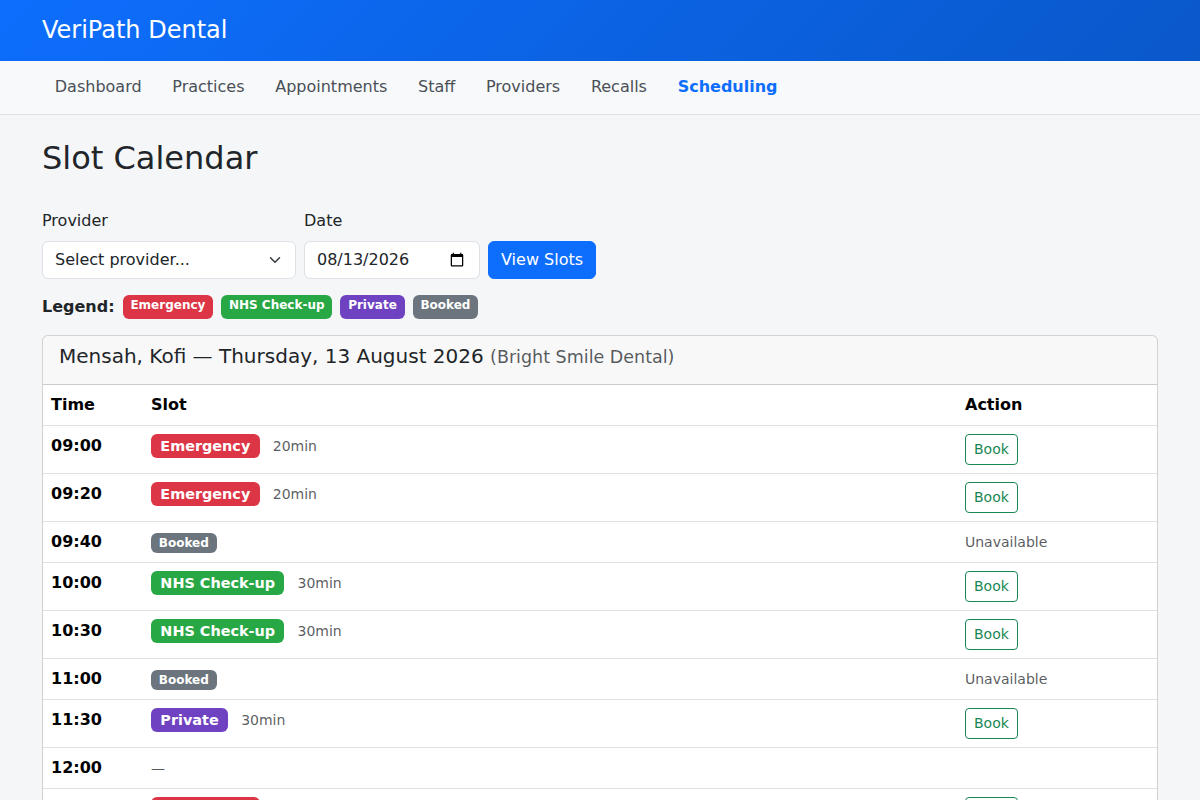
At a glance, the whole team can see:
| What you see | What it means |
|---|---|
| Red Emergency badge | A protected urgent slot, free to book |
| Grey Booked badge | The slot is already taken |
| — (dash) | No schedule at that time |
No separate spreadsheet, no whiteboard in the back office, no "ask the manager what's free". The practice's urgent-care capacity is on the same calendar as everything else — visible, accountable, and impossible to lose.
From phone call to protected slot
When a patient needs urgent care, the team works through the symptom checker on the booking screen — the same three questions used across the app (see Triage). For urgent cases — severe pain not controlled by painkillers, dental trauma, a localised swelling or abscess — the patient is booked into a red Emergency zone slot, for care within 24 hours.
The booking is flagged for the practice's review, and the patient is given clear self-care advice at the point of booking. (Life-threatening red flags are never booked at all — the app stops those bookings and directs the patient to emergency care, as covered in Triage.)
Slot holds: urgent capacity never gets locked away
There is a subtle problem with urgent slots: a patient phones, asks for the 10am emergency slot, and then... never arrives, or books elsewhere. Left unmanaged, that slot sits empty while the phone keeps ringing.
VeriPath Dental handles this with a short slot hold. When an urgent slot is offered, it is held for 5–10 minutes while the booking is completed. If the booking is abandoned — the patient walks away, or the call drops — the hold releases automatically and the slot is available again for the next urgent caller. Nothing stays locked, and the practice's urgent capacity is never silently eaten by an abandoned booking.
Set your own urgent-care capacity
The practice — not the software vendor — decides how much urgent capacity it keeps and when:
- Define an Emergency zone — set the appointment length and which clinicians (dentists) can cover urgent slots.
- Attach it to schedules — choose which days and times the emergency block is protected in each dentist's diary.
- Add capacity at short notice — if a busy winter week is filling up, a manager can add an extra emergency block for today in minutes.
- Respond when the calendar shows no urgent slots — the team can see immediately whether the zone or the schedule is the gap, and fix it rather than guessing.
This is capacity management that stays in the practice's hands — configurable per practice, per day, and per clinician, with no IT involvement.
What this means for the practice
- Urgent patients are never "fitted in". They are booked into time that was set aside for them — seen within 24 hours, without displacing routine care.
- The diary stays intact. Routine appointments are not constantly rearranged to absorb urgent cases.
- Capacity is visible and accountable. The whole team can see how many urgent slots are left today, on the calendar they already use.
- Clinical time is protected. Dentists know their urgent slots in advance, instead of having emergencies dropped into their day at random.
- No wasted capacity. Slot holds mean abandoned bookings release their slot back to the next patient who needs it.
- Patients notice the difference. A practice that can say "yes, we can see you tomorrow morning" — calmly, because the system guarantees it — is a practice patients remember.
Part of a connected patient-management workflow
Emergency slots are one half of the urgent-care story — the capacity half. The other half is how urgency is decided and tracked:
- Triage — how every request is checked, sorted into urgency tiers, and followed up in the triage queue.
- Appointment Booking — the screen the checker runs on, and the calendar the protected slot is booked from.